Intro
native mode or SharePoint integrated mode (? rendering as html)
Data in Report Builder
-
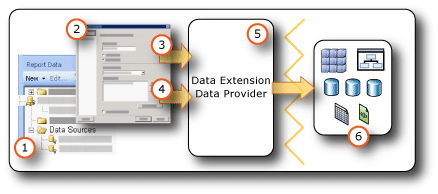
Data sources in the Report Data pane A data source appears in the Report Data pane after you create an embedded data source or add a shared data source.
-
Connection Dialog Box Use the Connection Dialog Box to build a connection string or to paste a connection string.
-
Data connection information The connection string is passed to the data extension.
-
Credentials Credentials are managed separately from the connection string.
-
Data Extension/Data Provider Connecting to the data can be through multiple data access layers.
-
External data sources Retrieve data from relational databases, multidimensional databases, SharePoint lists, or Web services.