Usefule system analysis tools
lsof
List Open Files
The lsof command is used in many Linux/Unix-like systems to display a list of all the open files and the processes. The open files included are disk files, network sockets, pipes, devices, and processes.
One of the main reasons for using this command is when a disk cannot be unmounted and displays the error that files are being used or opened. With this command, you can easily identify which files are in use.
tcpdump
Network Packet Analyzer
The tcpdump command is one of the most widely used command-line network packet analyzer or packets sniffer programs that is used to capture or filters TCP/IP packets that are received or transferred on a specific interface over a network.
It also provides an option to save captured packages in a file for later analysis. tcpdump is almost available in all major Linux distributions.
netstat
Network Statistics
The netstat is a command-line tool for monitoring incoming and outgoing network packets statistics as well as interface statistics. It is a very useful tool for every system administrator to monitor network performance and troubleshoot network-related problems.
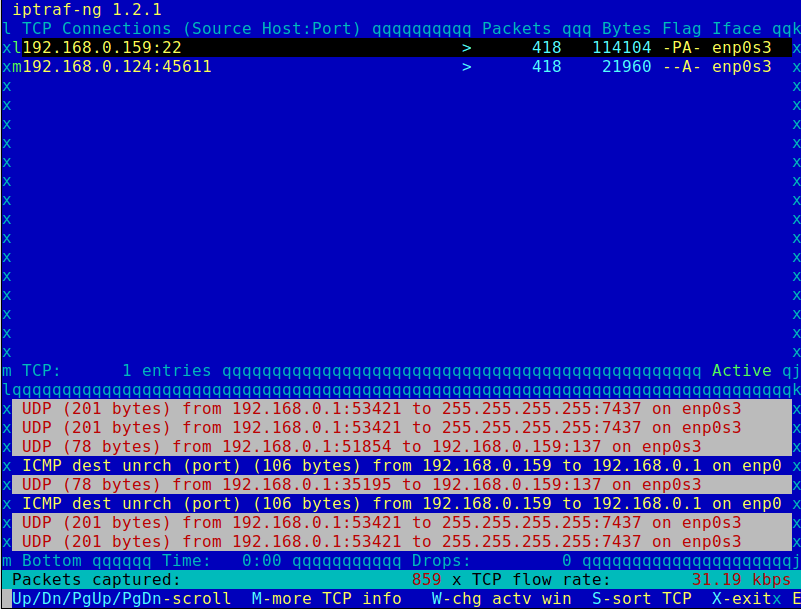
IPTraf
Real-Time IP LAN Monitoring
iptraf-ng
sudo apt-get install iptraf
IPTraf is an open-source console-based real-time network (IP LAN) monitoring utility for Linux. It collects a variety of information such as IP traffic monitor that passes over the network, including TCP flag information, ICMP details, TCP/UDP traffic breakdowns, TCP connection packet, and byte counts.
It also gathers information of general and detailed interface statistics of TCP, UDP, IP, ICMP, non-IP, IP checksum errors, interface activity, etc.